Purple Editorial Concept
Purple Editorial
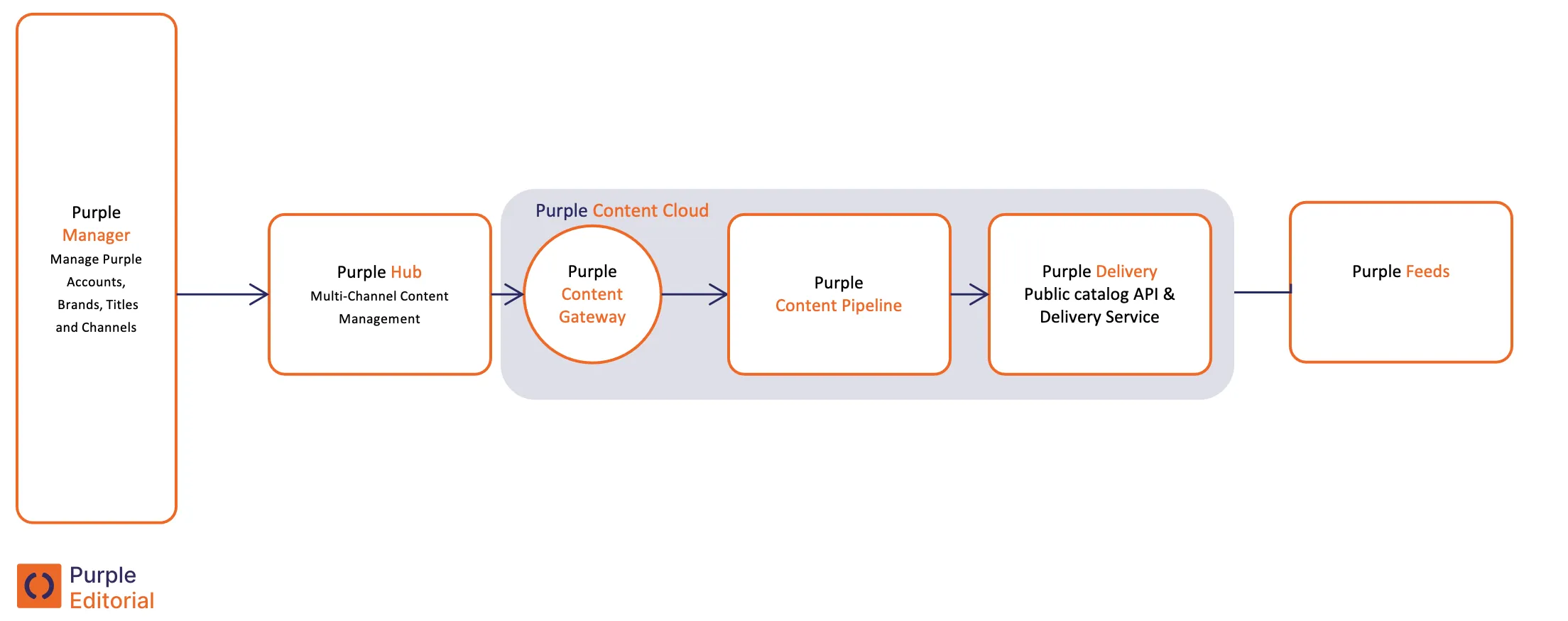
Purple Editorial is the component of Purple responsible for the creation, refinement and technical distribution of editorial content within our Publishing Suite. It comprises four key modules: the Purple Manager, the Purple Hub, the Purple Content Cloud and Purple Feeds.
Purple Editorial is considered "the Backend" of Purple, as none of these modules is facing the readers of your magazines/newspapers.
Purple Manager
Purple Manager serves as the central administration tool for Purple. It is where new projects are created as 'teams', each with their associated user profiles. Also, Publications are generated within Purple Manager to organise content for one of your publications. Additionally, Purple Manager serves as a control panel for your Purple Apps and Websites. This control panel oversees their creation and provides a variety of configuration options. Moreover, it is within Purple Manager that you build new Purple Apps and customise their settings to meet your newsroom's specific needs.
Purple Hub
The Purple Hub is the editorial system within Purple, enabling your Editorial Team to create and distribute articles across multiple channels. The channels to distribute your content from Purple Hub include websites, apps and social media platforms. It is a WordPress-based Content Management System (CMS) that has been extensively customised to meet the needs of modern newsrooms. Purple Hub's key features include interfaces for writing articles, managing incoming wire news items, creating feeds, curating summary pages and other editorial functionalities.
One of the unique characteristics of the Purple Hub is its decoupled (headless) CMS architecture. Unlike traditional CMS platforms, it separates backend operations from front-end presentation, focusing solely on providing core CMS functionality without an end-user-facing website.
Purple Content Cloud
The Purple Content Cloud is where content gets published so that it is available online. It is the central repository within Purple for storing, transferring and delivering all your data within the publishing suite. Accessible via the Catalog API, it provides a versatile interface for retrieving data and facilitates the seamless transfer of content from Purple to external front ends, allowing integration into multiple distribution channels like apps, websites, newsletter tools or print systems.
Purple Feeds
Purple Feeds is a service that generates RSS feeds that contain articles or news content from Purple Editorial. The feeds can be configured using the Purple Hub and contain content published to the Purple Content Cloud.