Using "Scheduled Actions"
Summary
You will learn what "Scheduled Actions" are, how to enable this feature, and how to use them.
Preconditions
- Have a Purple Editor role in the Purple Hub
- Have an administrator enable the "Scheduled Actions" feature for you in your Hub
See also
What are scheduled actions?
Scheduled actions are times in the future where an article automatically gets modified. They are shown and can be managed in the sidebar of the editor, in the "Upcoming actions" section. Currently, we support scheduled publishing, scheduled unpublishing, scheduled access-level-changes, and changes to Article Meta-Fields (see Create Custom Fields in Purple Hub) as actions. As seen in the screenshot below, multiple actions can be defined for an article, even multiple actions of the same type. This way, complex visibility changes and meta field changes of the content can be planned and configured in advance.


Publishing / Unpublishing
If the publishing date of the article is set to a date in the future, there will always also be a scheduled publish-event in the list of upcoming events corresponding to it. But if the article is set to publish "immediately" or is set to a date in the past, no upcoming publish event is shown in the list.

Special case: Republishing
You can use Scheduled Actions to schedule a "Re-Publish" for your article. Given an article that is already published (i.e. it has a publishing date in the past and is already visible to your readers), you can add a new "Publish" scheduled action for some date in the future. After clicking "Update", the article will remain visible, and no change will be visible to your readers. But once the selected publish-time comes, the date of the article will be re-set to that date, making it appear re-published.

Access level changes
When configuring an access level change, the article will have its access level changed at the selected date and time. If the article is published by then (e.g. manually published, or via an earlier scheduled publish action), the change in access level will also be published and immediately visible in the content cloud and any frontends.
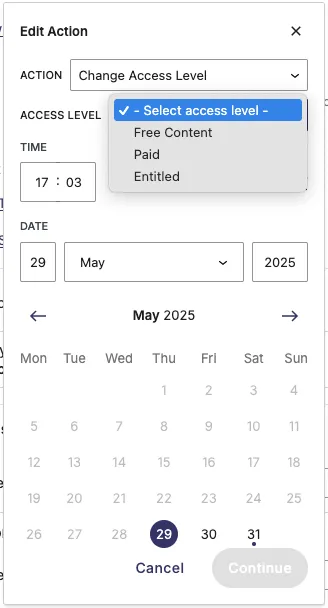
Access level definitions can be configured by administrators in the Hub. However, modifying existing access levels may affect scheduled actions that are already set up for articles. Renaming access levels is safe, but changing their order can cause unexpected results.
Custom field changes
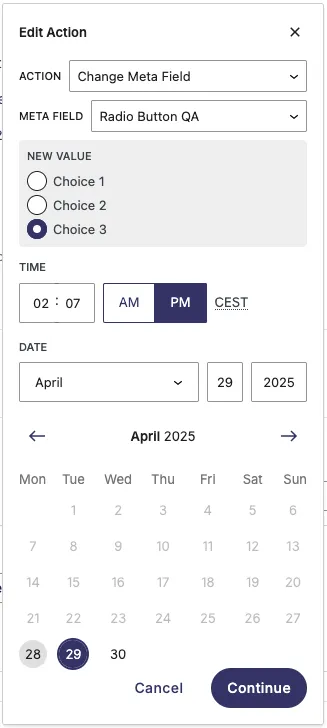
Changing any custom field is also possible, like with a radio field shown below. The field will switch to the selected value at the configured time, and the change will also be published automatically if the article is published at the time of change.
Multiple time zone support
When the user is another timezone, then the general time zone of the Hub. Then an extra time block is shown: showing the scheduled time both in the time based on the Hub time zone as well on the time zone of the user.
Migrating to scheduled actions
Scheduled actions are an opt-in-feature, meaning existing projects will not have this by default, but it needs to be activated by an administrator on the hub-settings-page.
Articles that have a configured unpublish date will be migrated to scheduled actions, so that they have an unpublish-action on the same time as configured beforehand.
Careful: There is no automated data migration for the reverse operation, so when disabling the scheduled actions feature again, posts will have no unpublishing date configured.
 Before activating scheduled actions |  With scheduled actions activated |
|---|