Frontend Links in Purple Hub
3 min
Purple Hub can automatically display the correct frontend URLs for your posts in the editor interface, making it easy to see and share the actual public URL of your content.
What You'll See
When editing a post, the Permalink section in the editor sidebar shows your actual frontend URL instead of an internal hub domain:
- Before configuration: The placeholder https://your-website-here.com/{article-slug}
- After configuration: The actual correct link on your website
Before | After |
|---|---|
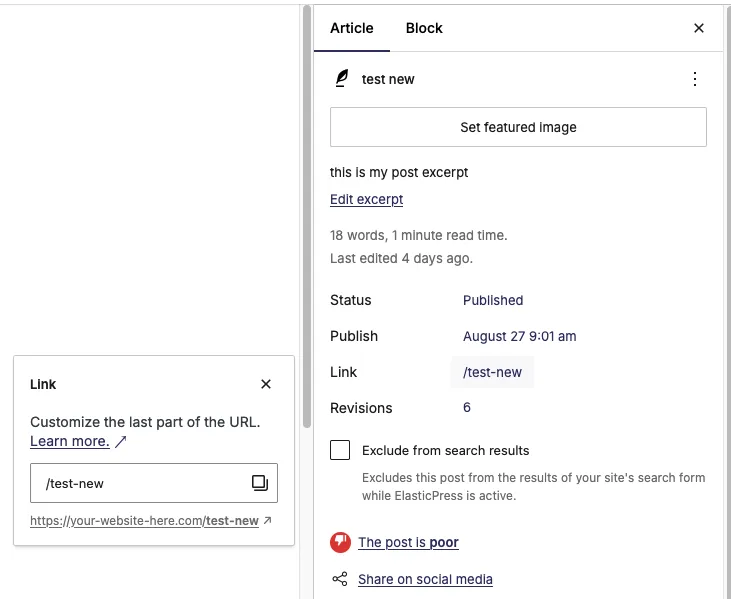 | 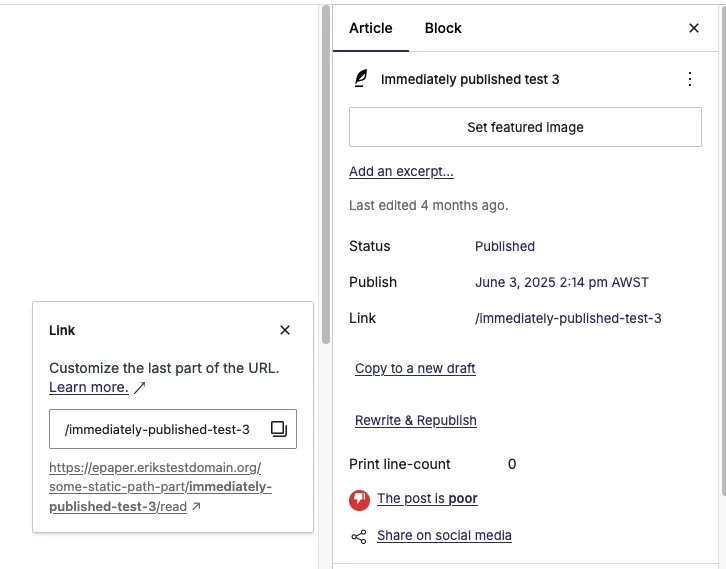 |
Prerequisites
To enable correct frontend URLs, you need:
- Configured web domain: Your app must have a custom web domain set up in Purple Manager. See Custom domain setup.
- Configured URL resolver script: Your (prod-released) dynamic resources need a valid URL resolver configured. See Implementing URL Resolver.
- Published content: Posts must be either:
- Release-published to the Content Cloud, OR
- Release-Scheduled (planned) with a future publication date
For scheduled posts, the Future Contents API must be enabled in Purple Manager's API configuration page. See Catalog-API (Future Contents / Teasers)
How It Works
Purple Hub automatically queries the Purple Supergraph API to:
- Get your app's configured web domain from the webConfig
- Look up the post's URL path using the URL resolver service
- Combine domain + path to show the complete frontend URL
This happens automatically in the background with no configuration needed in the Hub itself.
Benefits
- Easy sharing: Copy the correct public URL directly from the editor
- Easy frontend verification: Just click the link to see how your updated article looks on the actual website
- Newsletter links: Newsletters need the correct frontend URLs for linked posts. See Newsletters.