Image Usage Tracking
Overview
Image Usage Tracking shows where an image is actually used across the site, for example to check whether an image can be removed, or to prepare licence payments to photographers. It counts images used in article content, as a featured image, or in an image field created with ACF. Only content types that have their own overview page (Articles, Issues, Dossiers, Pages, Newsletter, Ads, Interstitials, etc.) are counted; usage inside trashed posts is not.
Used in (File Detail view)
Every image's File Detail view shows a Used in field.
- If the image isn't used anywhere, the field shows a dash (–).
- If the image is used at least once, the field shows the total number of places, for example 3 Places. Clicking it opens a tooltip with a breakdown by content type, plus a Total line at the bottom.
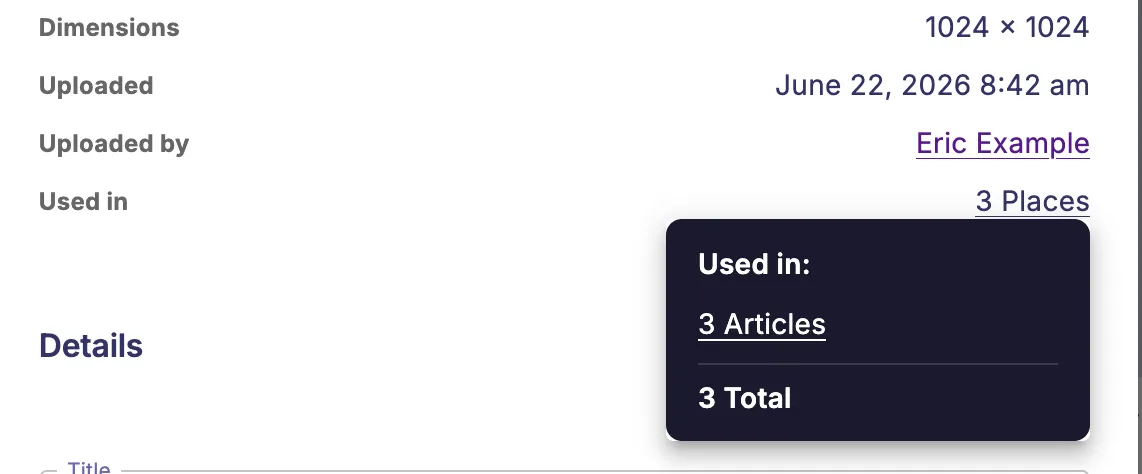
Clicking one of the lines in the tooltip opens that content type's overview screen (e.g. the Articles overview) in a new tab, filtered to Contains file: filename, so only the posts that actually use the image are listed.
This count updates automatically: as soon as a post is saved or deleted, or the image itself is removed, the numbers are recalculated.
Usage summary in the Media Library
When the Media Library is filtered or searched, for example filtered down to one photographer's images using a custom field, a Used in summary also appears next to the result count at the bottom of the Media Library.

This summary adds up the usage of every image currently matching the filter, and shows how many published places they're used in together, for example Used in 24 places. Hovering over it shows a tooltip with the breakdown by content type. For Articles specifically, published and unpublished usage are shown as two separate lines (e.g. 10 published Articles / 2 unpublished Articles); other content types are shown as a single line.
Unlike the tooltip in the File Detail view, this tooltip is not clickable — it's meant to give a total count only, not to link to individual posts.
If a filter matches a very large number of images, the summary is based on the first matching images only and the label shows a + (e.g. Used in 50+ places) to indicate the true total may be higher.