Purple Wires: Editor Sidebar
4 min
Summary
The Editor Sidebar allows you to browse and insert wire articles directly while editing a post in the Gutenberg editor. Instead of navigating to the Wires article overview, you can search and filter recent wires and apply them to your current article with a single click.
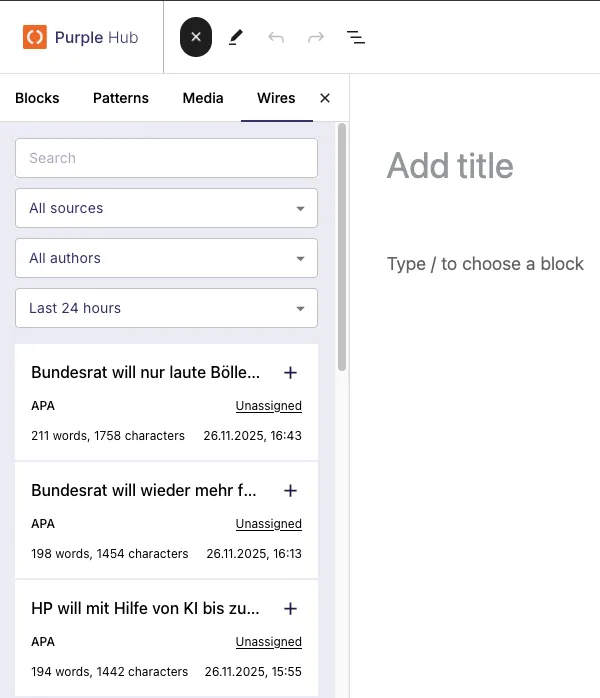
The Purple Wires sidebar was opened on an empty article.
Opening the Sidebar
- Open any post in the Gutenberg editor
- Click the + button (block inserter) in the top left
- Switch to the Wires tab
The sidebar displays a list of recent wire articles from your configured sources.
Filtering Wires
You can filter the displayed wires by:
- Source: Select a specific wire source (e.g., DPA, Reuters)
- Author: Filter by the author associated to the article. See also Purple Wires: Source set up page
- Time period: Limit results to articles from the last:
- 24 hours (default)
- 48 hours
- 72 hours
Use the search field to find specific articles by keyword.
Using a Wire Article
To insert a wire article into your current post:
- Click on the wire article you want to use
- A confirmation dialog appears with a warning
- Click Continue to apply the wire, or Cancel to abort
Using a wire article will overwrite the current post's title, content, date, and author. Make sure you want to replace your existing content before confirming.
Requirements
- Purple Wires plugin must be active
- At least one wire source must be configured