Week Board
The Week board is a Kanban view in the Purple Hub that lays out your posts by date. Each column is a calendar day and each row (swimlane) is a week, so you can see and plan what is scheduled across the coming days at a glance — without switching to the List or Calendar view.
It is one of the fixed board types available in the Hub and is designed for date-based planning: instead of grouping cards by status, the Week board places every post in the day it is scheduled for.
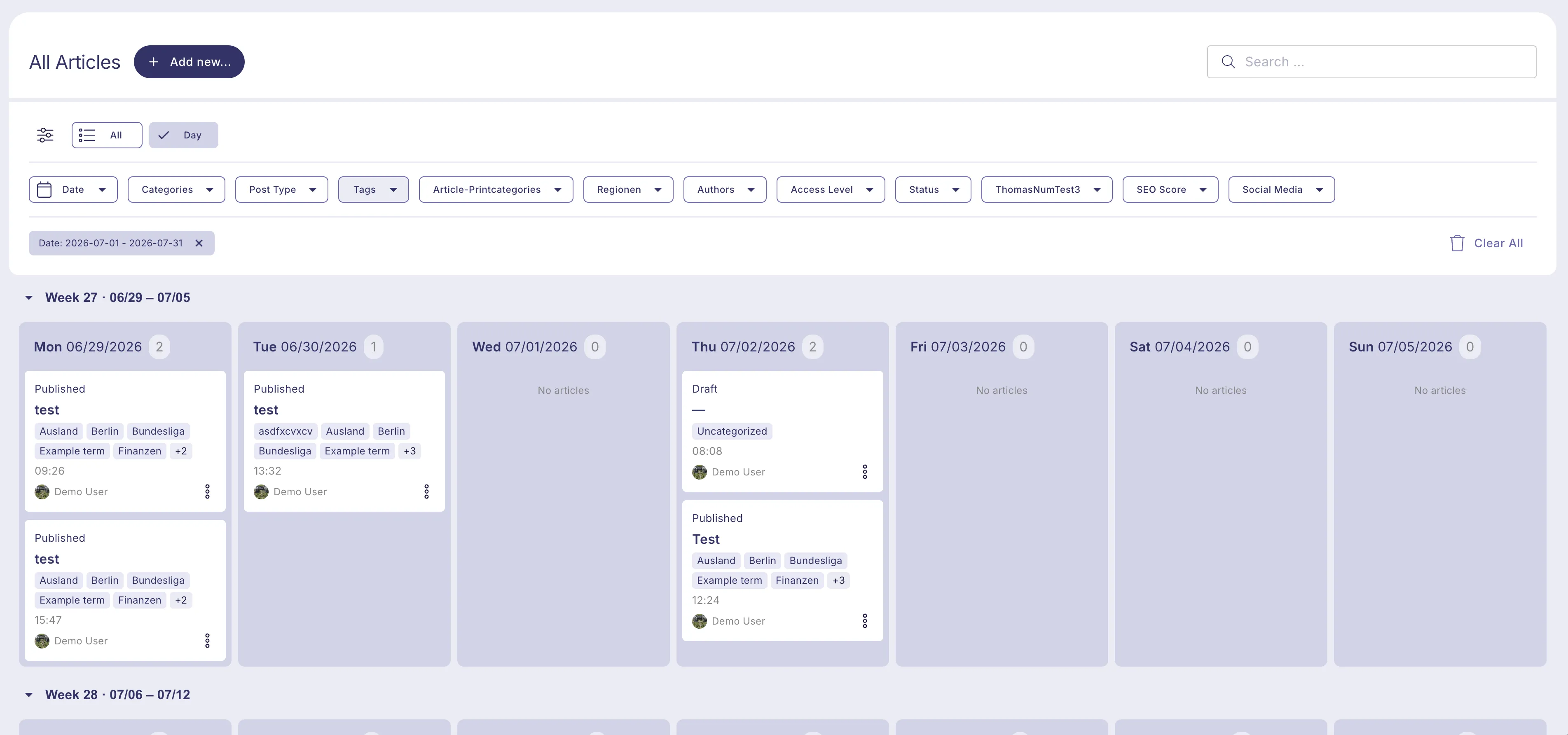
Layout
- Columns are days. Each column represents a single calendar day.
- Swimlanes are weeks. Each horizontal swimlane represents one week, running Monday to Sunday.
- Sticky headers. The day (column) headers and the week (swimlane) headers stay visible while you scroll, so you always know which day and week you are looking at.
- Day counts. Each day header shows the exact number of matching posts for that day. This is the full count for the current filters, not just the cards currently loaded on screen.
Rescheduling posts
You can drag a card to a different day to change its scheduled date.
- Drafts and other non-scheduled posts are rescheduled directly. The new date is applied immediately and a success message is shown.
- Scheduled and published posts (statuses publish and future) show a confirmation dialog before the move is applied, because changing the date can affect the post's scheduled publishing behavior. The move only takes effect once you confirm.
After a successful move, a confirmation message is shown.
Deleting posts
Each card has an action menu (the three-dots menu next to the language flag) with a Delete option. Selecting it asks you to confirm, then moves the post to the trash. Once confirmed, the card is removed from the board and a success message is shown.
Filters
The Week board respects the Hub's persistent global filters — the same filters you use in the List and other views apply here on top of the board.
- Filters persist when you switch between List, Week and other view modes.
- There are no board-specific preset filters (such as published/draft presets); only the global filters apply.
- The weeks shown are always the weeks configured in the filter. When more than two weeks are selected, additional weeks are loaded as you open their swimlane.
Loading more posts
To keep columns readable, each day column shows at most 20 posts. When a day contains more than that, a Show more control is offered for that week and loads the next 20 posts per day.