Aptoma DrEdition Integration
Aptoma DrEdition Integration
The Aptoma integration connects Purple Hub to Aptoma DrEdition, enabling print editors to browse and place Hub articles directly inside DrEdition's print layout tool. Purple Hub acts as a content source: Aptoma fetches articles from Purple, and editors lay them out in DrEdition's LayoutPreview.
How it works
Purple Hub stays the single source of all article content. Data moves between the two systems in three ways:
- DrEdition pulls articles — DrEdition reads the list of Hub articles for its article browser, and fetches the full article (text, images, metadata) whenever it is placed or the LayoutPreview is rendered.
- Purple Hub notifies DrEdition — when an article that is already placed in an edition is saved, Purple tells DrEdition to re-render it (see Live layout updates below).
- Placements flow back to Purple Hub — with data sync enabled, Purple reads Aptoma's products, editions and article placements, so editors can see in the Hub where an article was placed (see Print monitoring view and Jumping from Hub to Aptoma below).
Nothing else is transferred from DrEdition back into Purple Hub.
Prerequisites
- An active Aptoma DrEdition license with a ready-to-connect instance
- Administrator access to Purple Hub
- (Optional) Purple DAM with the Print Images feature enabled, for high-resolution print file delivery
Setup
Go to All Settings → Purple DS Hub Settings and activate the Enable Aptoma integration checkbox. This makes the Settings → Aptoma page available.
The Aptoma settings page contains all configuration instructions, credentials, and JSON snippets needed to complete the connection on the Aptoma side. Follow the instructions there.
Features
Item labels
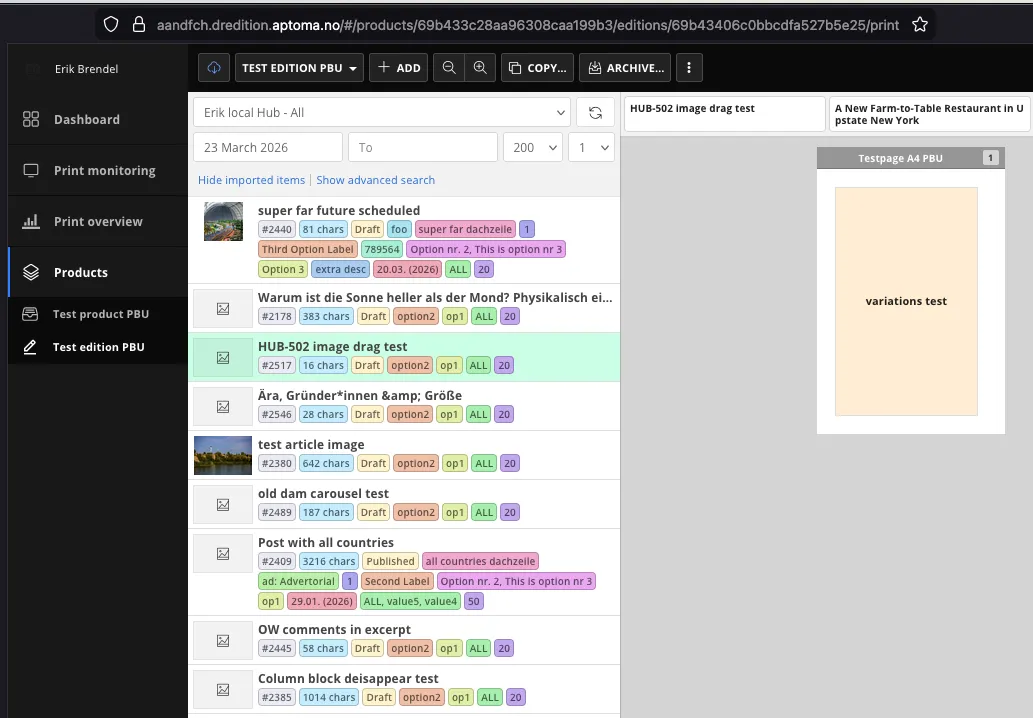
Colored badges shown on each article card in DrEdition's article browser. You can configure which fields they display (post ID, character count, status, ACF fields) and their colors.
Whenever you change the item labels, the content schema in Aptoma DrEdition needs to be re-imported. The settings page will warn you and provide the updated schema to copy.
Print Placement
Lets editors flag where in print an article belongs — its edition, a placement code, a priority, and a slot size — and sends that as a dedicated "placement" block in the content-source feed, separate from the item-labels "data" block, so DrEdition's placement bot can auto-place articles without manual work.
Enable it via its own toggle on the Aptoma settings page. This adds a placement panel to every post's editor sidebar, and registers a dedicated taxonomy for maintaining the available placement codes, manageable from the WordPress admin like any other taxonomy. The panel also lets you assign the article to one of the synced product editions; that's used to route the article into the right per-edition feed rather than being part of the placement block itself.
Beyond the built-in placement fields, any number of additional ACF or taxonomy fields can be picked to include in the placement block too, the same way fields are picked for item labels above.
Placement codes
It is possible to assign placement codes only to specific products. To do so, open the placement code, where a list with all available products is shown. Select your desired products and click on "Save". From now on, the code is only shown for posts that have this product selected, and in the Print board only for editions inside these products the code is shown as a column.
Block mapping
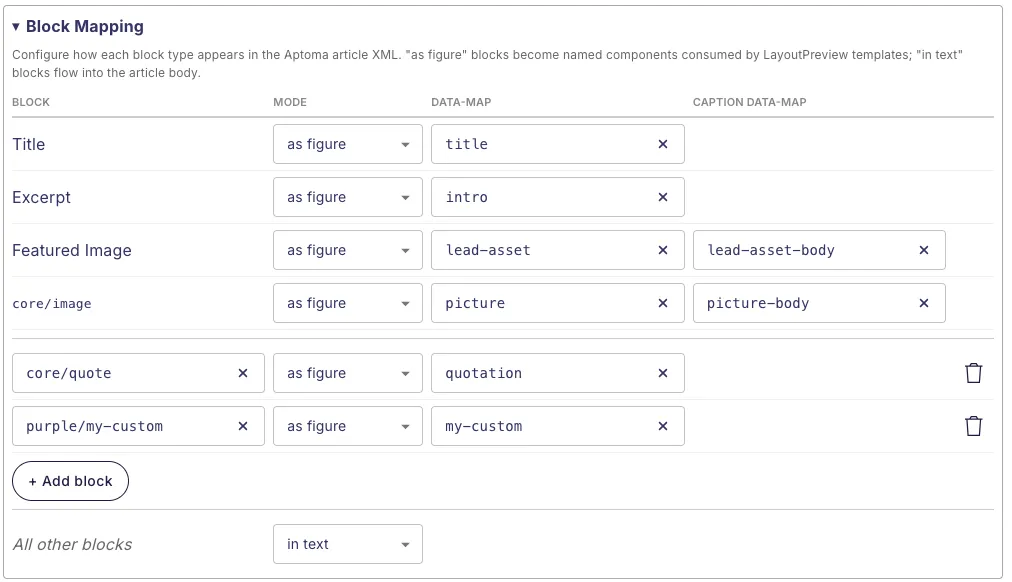
Controls how each WordPress block type is converted when Purple delivers an article to LayoutPreview. Each element (title, excerpt, featured image, inline images, custom blocks) can be set to:
- Figure — exported as a standalone named component, referenced by identifier in your DrEdition layout template
- In-text — exported as part of the flowing body text
- Omit — excluded from the export
- Omit, keep children — available for custom blocks only: the block's own wrapper is dropped, but the blocks nested inside it are still processed by their own mapping. Use this for container/wrapper blocks when you want to map their children individually but not export the wrapper itself.
Block mapping applies at every nesting level, not only to top-level blocks. A child block is matched by its own block name wherever it appears, so a block nested inside another can be mapped independently — for example, exported as a figure while its parent block flows in text. A block set to figure is pulled out of its parent's body flow into its named component (it is not duplicated in both places). To drop a purely structural wrapper block while still mapping the blocks inside it, set the wrapper to omit, keep children.
Configure the identifier names to match your DrEdition template.
Live layout updates
When an article is saved in Purple Hub, Purple automatically notifies Aptoma so DrEdition can re-render the LayoutPreview immediately — without the print editor having to refresh. Requires the Aptoma API key to be entered on the settings page.
Print image variants
If an image has a print variant set up in Purple DAM, Purple passes the high-resolution print file URL to Aptoma alongside the web image. DrEdition uses this to place the correct file in the layout. Requires the Print Images feature to be active — see Print Images.
Image Focus Point & Cropping
When an image in an article has a crop rectangle or focus point set in Purple, that information is forwarded to Aptoma as the image's area of interest (AOI). Aptoma's smart-crop uses it to position and crop the image in the print layout, so the editorially chosen subject and framing are preserved instead of a naive centre crop.
- A focus point without a crop is valid, Aptoma falls back to the full image as the rectangle and uses the focus point as the crop centre.
- If an image has neither a crop nor a focus point, no area-of-interest data is sent and Aptoma applies its default behaviour.
No configuration is required, the data is included automatically whenever the article is sent to Aptoma.
For setting crops and focus points, see Image Cropping in Purple Hub.
Metadata styling in LayoutPreview
ACF field values and WordPress taxonomy terms are automatically added as CSS class names on the article's <article> element in LayoutPreview HTML. This lets DrEdition template designers style layouts differently per section, category, or any other metadata — without any extra configuration.
Class name format: fieldname--value, lowercased and hyphenated. For example, an article with ACF field ressort = "Nachbarschaft" and category Stadtleben gets:
class="ressort--nachbarschaft category--stadtleben"For instructions on creating ACF fields, see Create Custom Fields in Purple Hub.
Template filtering via data-map
DrEdition can restrict which article templates are offered for an article based on its data-map attribute. By default, every Hub article is delivered with data-map="article".
Under Settings → Aptoma → Block Mapping → Article data-map, you can select ACF fields and taxonomies whose values are added to the data-map, in the same fieldname--value format as the CSS classes above. For example, an article with the ACF field sonderformat = "Mini-Artikel" selected gets:
data-map="article sonderformat--mini-artikel"The fields are added in the order selected. If none of them has a value on an article, the data-map stays article.
Print monitoring view
When data sync is enabled on the settings page, an Aptoma Monitoring item appears in the Purple Hub admin menu. It shows which articles are placed in which Aptoma edition, along with page number and placement dimensions, synced from the Aptoma API. The data is kept up to date via a webhook, setup instructions are on the settings page. Manual sync is also possible.
Jumping from Hub to Aptoma
Once an article has been placed in an Aptoma edition, Purple Hub shows clickable Print placements chips that link straight to the corresponding edition and page in Aptoma DrEdition. Each chip is labelled with the product and edition; hovering it reveals a tooltip with the placement position. Clicking a chip opens the placement in Aptoma in a new browser tab.
The chips appear in two places:
- Editor sidebar — in the article editor, a "Print placements" section lists the editions the current article is placed in.
- Post Overview — a "Print placements" column shows the same chips for every article (enable it via the column settings, see Set Columns in Overview pages).
The Post Overview also offers a Print placements filter. Each filter option shows a product and edition; applying it lists every article that was added to that exact edition, whether or not it has already been placed on a page.
Jumping from Aptoma to Hub
The same works in the other direction: DrEdition can show an "Open in Purple Hub" button on every Hub article — both in the content source list of a page plan and on articles that have already been placed on a page. Clicking it opens that article in the Hub editor in a new browser tab.
This button is not created automatically, it has to be set up once per DrEdition instance as a URI Template. The Aptoma settings page in the Hub lists the exact values to enter — role, source name, label and the URL template, ready to copy — under "Link Back to the Hub" in its setup instructions.
Location: Add as new section at the end of the page, after "Jumping from Aptoma to Hub" (before the closing divider)
Limitations
Current limitations
- Live layout updates only react to text changes — a re-render is triggered when the title, body or excerpt changes. Changes to images, custom fields or categories appear in DrEdition only once the article is reloaded there.
- Full image handling only for standalone images — the featured image and standalone image blocks get the print file, crop, focus point and image metadata. Images inside galleries or other blocks are delivered as part of that block's HTML, without these. Tables, lists, embeds and other blocks are delivered as HTML or omitted, according to the block mapping; they are not converted into DrEdition-specific structures.
- Placement sync is not instant — placements are synced from Aptoma about once per minute, and immediately when an edition is saved in DrEdition (if the webhook is set up). An edition that is un-archived in Aptoma is only picked up again by a manual sync on the Aptoma Monitoring page.
Not supported by design
- One DrEdition instance per hub — a hub connects to exactly one Aptoma account with one API key and one content source. Any number of products and editions within that account are supported.
- No content write-back — text changed in DrEdition (e.g. shortened for copyfitting) is not transferred back into Purple Hub. Only placement information flows back.
- No edit lock — articles stay editable in Purple Hub after they have been placed in an edition. Text changes reach DrEdition via live layout updates.
- Figures leave the text flow — an element mapped as Figure is delivered as a separate component, so its original position within the body text is not carried over.