Context Data
The context object $context provides information like data results for the views. You can use it to get the content fields of the context object inside the views.json.
Example | Usage |
|---|---|
$context.issue (deprecated) | accesses a data source of type issue |
$context.platform | Possible values: web, android, ios |
$context.subscription | it's filled when subscription data source is used |
$context.content | accesses data for a content |
$context.preview | the value from the url, e.g. https://www.example.com/somearticle.html?preview=true, only available in web |
$context.preview_app | the preview_app metadata key states the same value as context.preview, but in app |
$context.userAttributes | You may set and access data related to the user here. It's persisted in local storage. |
Intro $global
Global application data (e.g., menus, configs, and taxonomies) have a separate scope for being accessed. The "global" scope is implemented as an object on the window level, so it will get reloaded when reloading the page. Configure "Global" for your application within the views.json.
Within Global, you may specify data sources that store their data under the "contextKey" in a global scope object. Additionally, a StoreData object containing key-value pairs may be given, which stores the evaluated values (replaceString) under the key in the global scope object.
The global section is executed only once at "app start" within SSR if the global scope does not exist yet. We do not perform any change detection.
In all evaluations besides $context and $functions, there is also $global available to access that global store.
Note: When evaluating any value in a field (whether static or dynamic), all falsy values—such as undefined, null, false, 'undefined', 'null', and 'false'—will be returned as null.
Body Tag Attributes
Body tag attributes are pieces of information that are added to your website's main HTML<body> element. These attributes represent the experience view context.
Body attributes appear in your website's HTML like this:
<body data-storefront-platform="web" data-pxp-device_os="web" data-pxp-preview_app="false">
  <!-- Experience website content -->
</body>
This attributes:
- Start with a prefix (like data-storefront- or data-pxp-)
- Contain key-value pairs of information
- Are visible in the browser's developer tools
- Can be accessed by scripts and styling
What Changed in Experience 5.0.0
Now, only specific, essential information appears on your website's HTML body tag:
- Platform Information (Always Visible): data-pxp-platform Identifies what type of platform your website is running on (web, mobile, etc.)
- App ID (Development/Testing Only): data-pxp-app_idis visible when preview=true
- Custom Attributes: Additional information you specifically choose to display, configured in the experience-config.json. Example:
`<body data-storefront-device_type="desktop" data-storefront-locale="de_DE">`How to Configure Custom Attributes
1: Access Experience Configuration File
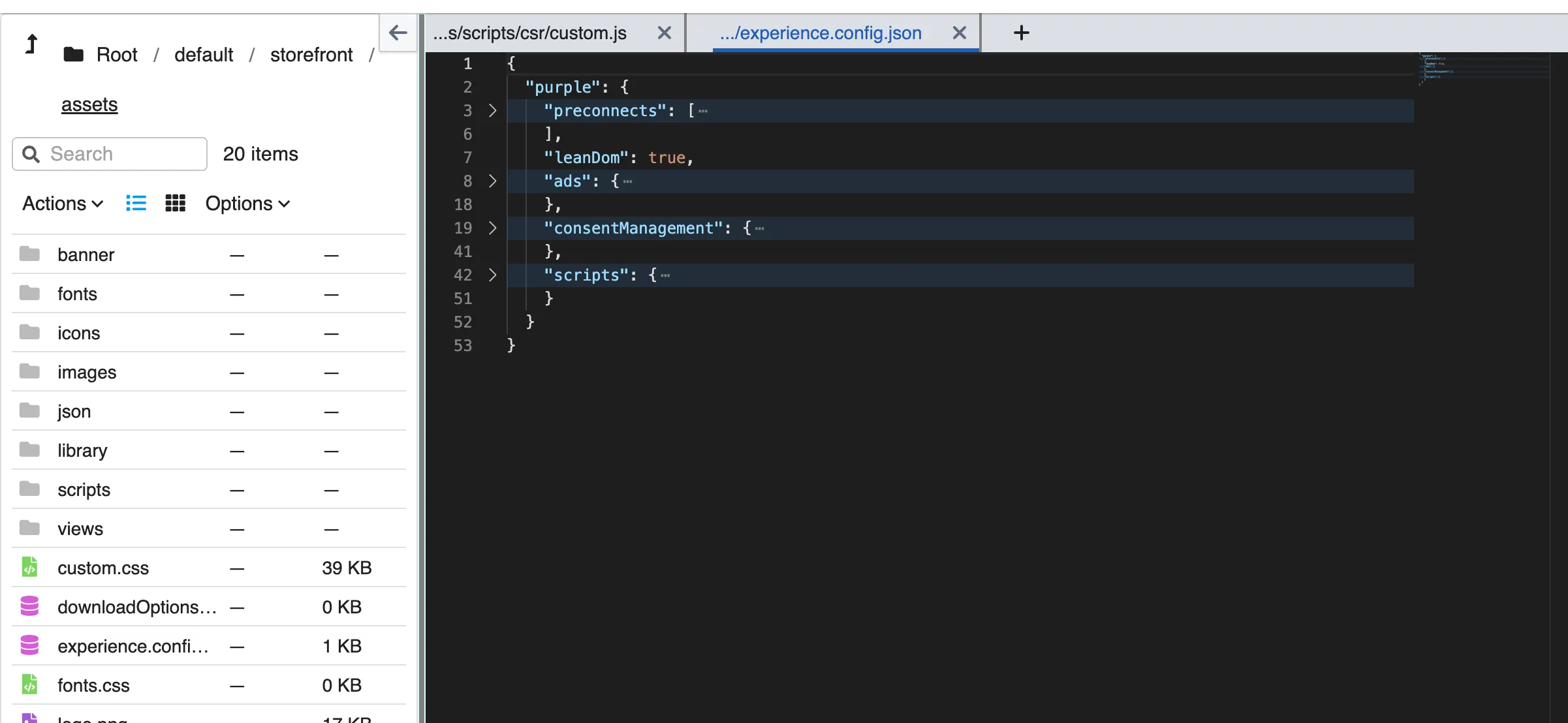
2: Add the Attributes
Add a bodyAttributes section in purple
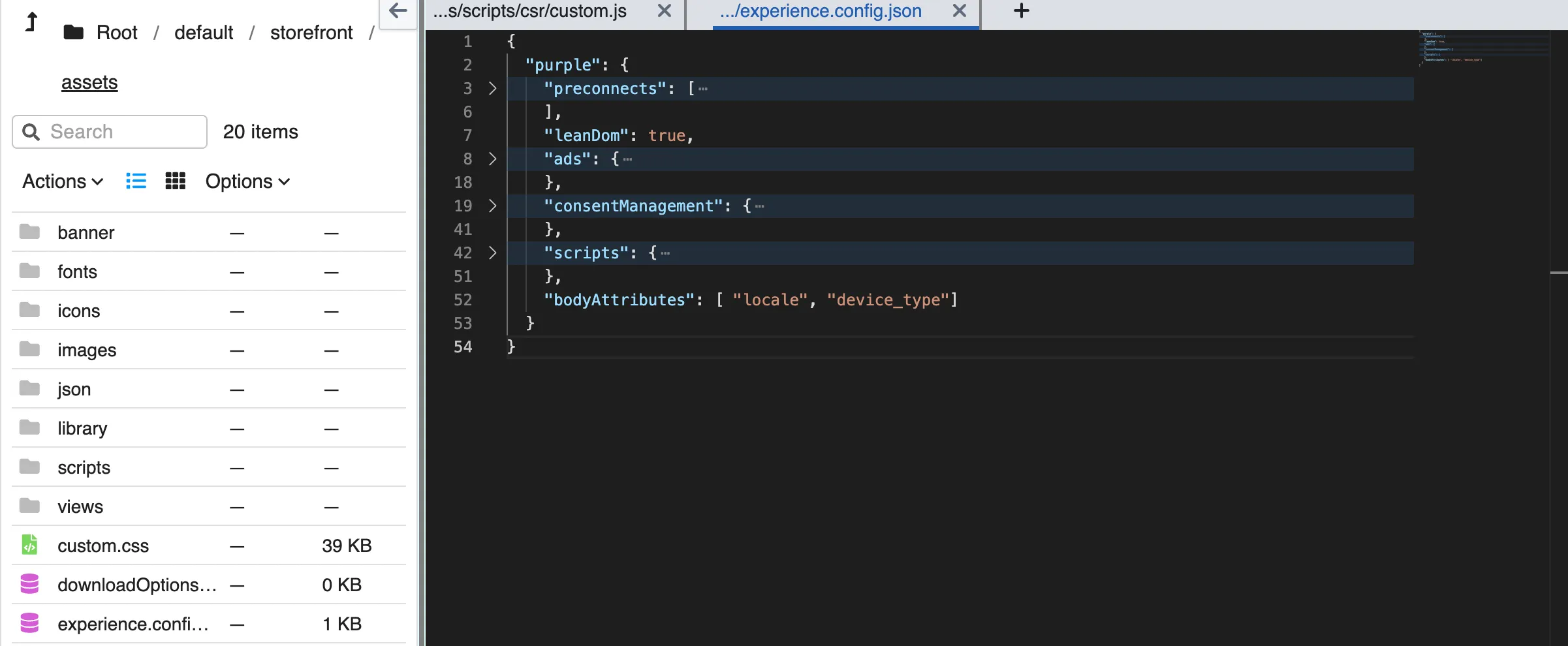
Context Updates
What Triggers a Context Update
Trigger | Changed key(s) | When it happens |
|---|---|---|
URL query param changes | Query param keys + resolved objects (publication, issue, category, search-result, …) | On every navigation or manual URL change |
Data source finishes loading | The data source’s contextKey | After each API response |
Entitlement / metadata refresh | All metadata keys (entitlement_token, today, connection_state, …) | After login/logout or explicit updateMetadata() |
Entitlement state change | (all components) | Broadcasts an empty {} change — forces full re-evaluation |
User attributes change | userAttributes | When setUserAttribute() is called |
Account data update | accountData | After login or updateAccountData() |
Network status change | connection_state | When device goes online/offline |
What the Context Object Contains
The $context object is built by merging several layers. Later layers override earlier ones when keys overlap.
Layer Order
- Fixed Fields
- initialUrl
- pathUrl
- userAttributes
- accountData
- outlet
- Metadata
- entitlement_token
- today
- connection_state
- Other platform metadata
- URL Query Params
- All parameters from the current URL
- View Context
- Resolved objects such as:
- publication
- issue
- category
- search-result
- Parent List / Swiper Item
- Injected when a component is a direct child of a list or swiper
Parent List Injection (Layer 5 Explained)
Each list item injects its data into the child component’s context.
Key behavior
- Default key = data source type
- Example: content → $context.content
- Can be overridden with:
{
"entryId": "customKey"
}
- Additional fields:
- $context.entryIndex → item position
- $context.groupIndex → group position (if grouped lists)